



Waiting for your Loksewa exam result can be stressful. You’ve worked hard, studied for hours, and now all you want is to know where you stand. The problem is, many candidates don’t know exactly how to check their results online, and the official website can sometimes be confusing.
Don’t worry. In this guide, we will show you how to see the Loksewa result step by step, so you don’t miss anything. Whether you are a student or already working, you’ll find the instructions easy to follow. By the end of this post, you’ll know exactly where to click, what details to enter, and how to download your result without any hassle.
In this blog
What is Loksewa Result and Why is it Important?
The Loksewa result is the official outcome of the exams conducted by the Public Service Commission (PSC) of Nepal. These exams are held for various government positions, including administrative, judicial, health, and technical services. When the result is published, it tells candidates whether they have passed and if they are eligible for the next stage of the selection process.
Understanding your Loksewa result is very important as it can shape your career and future opportunities. Knowing your result helps you plan your next steps, whether it’s preparing for interviews, attending additional tests, or looking for other opportunities.
Here’s why the Loksewa result matters:
- Merit List Confirmation: The result shows the official merit list. You can see where you stand compared to other candidates.
- Career Planning: Based on the result, you can decide whether to move to the next stage of recruitment or focus on preparing for future exams.
- Eligibility for Next Steps: Passing candidates may be called for interviews, practical tests, or document verification. The result guides you on what comes next.
- Motivation and Feedback: Even if you don’t pass, the result gives feedback on your performance and helps you understand areas for improvement.
- Official Record: Your Loksewa result is an official document that proves your eligibility and scores, which may be required for future job applications.
The Loksewa exam outcome also affects your career path significantly. For students, it can open doors to stable government jobs. For working officers, it may provide a chance for promotion or a new role in a different department. Therefore, checking your result carefully is crucial.
In short, the Loksewa selection process is a key step in building a government career in Nepal. Knowing your result early ensures you don’t miss any deadlines or opportunities. It also helps you make informed decisions about your career. Whether you are a fresh graduate or an experienced officer, understanding your Loksewa result is the first step toward achieving your career goals.
How to See Loksewa Result Online?
To check your Loksewa result online, visit the PSC official site, navigate to the "Results" section, select your exam category, and download the relevant PDF to find your name or roll number. If you've recently taken a Loksewa exam, you're probably eager to know your result. The Public Service Commission (PSC) of Nepal publishes exam results online for public access. Here's a simple guide to help you check your result without any hassle.
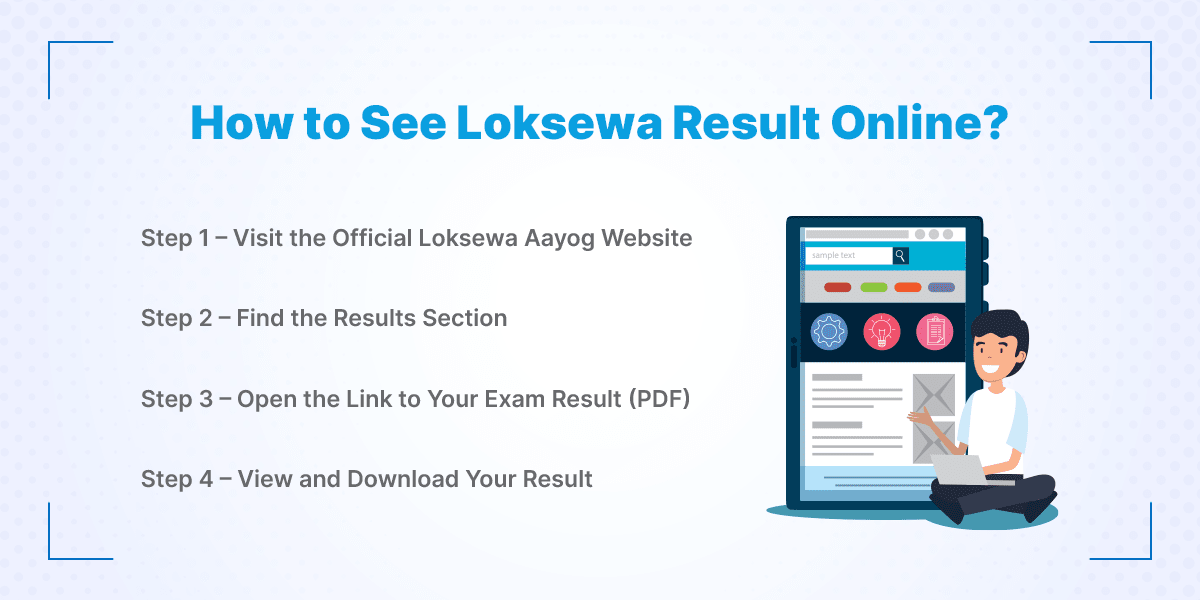
Step 1 – Visit the Official PSC Website
First, open your internet browser and go to psc.gov.np, which is the official website of the Public Service Commission. Make sure you type the address carefully to avoid fake sites. The homepage has all the information you need about exams and results. Take a moment to get familiar with the layout if you are visiting for the first time. This is the only place where the official Loksewa results are published. You don’t need to register or log in just to check the result. Simply being on the official site is enough to start.
Step 2 – Find the Results Section
Once you are on the homepage, look for the “Results” tab. It is usually in the main menu at the top or listed under the “Publications” section. Click on the tab to open the list of available results. You will see many exams listed, so make sure to scroll carefully. This section is updated regularly whenever a new result is released. Being in this section is necessary before you can access any exam PDF. Take your time to identify the correct exam before clicking.
Step 3 – Open the Link to Your Exam Result (PDF)
Now, in the Results section, find the link for your specific exam. Check the advertisement number or exam category to make sure it matches your exam. Click on the link, and a PDF file will open in your browser. Don’t worry if it takes a few seconds to load; larger PDFs may take some time. This PDF contains the full list of candidates and their results. You don’t need to download it yet if you just want to check your name. But make sure you have a PDF reader to view it properly.
Step 4 – View and Download Your Result
Once the PDF is open, press Ctrl + F on your keyboard to search quickly. Type your name or roll number in the search box. If your name appears, congratulations! You have successfully passed the exam. You can now download the PDF by clicking the download icon or saving it on your computer. Keep this PDF safely; it may be needed for future verification or interviews. If your name is not in the list, don’t panic; check the PDF carefully, and wait for official updates if necessary.
Common Issues While Checking Loksewa Result
Checking your Loksewa result online is usually simple, but sometimes candidates face small problems. These issues can be frustrating, especially if you are waiting eagerly to know your result. Don’t worry; most problems have easy solutions. Let’s look at the common issues and how to handle them.
1. Result Not Loading or Website Down
Sometimes the PSC website may be slow or temporarily down. This usually happens when many candidates are trying to check results at the same time. Don’t refresh the page too many times because it can make things worse. Instead, wait for a few minutes and try again. You can also check the website at a later time when traffic is low. Make sure your internet connection is stable before trying again. These delays are normal and are often due to server issues or website maintenance. Patience is key.
2. Forgotten Roll Number or Registration Details
If you forget your roll number or registration information, don’t panic. These details are needed to find your result in the PDF. Look for your exam admit card or registration confirmation email if you have it. If you cannot find them, note down other details like your full name and date of birth. Sometimes you can use these details to identify your name in the result PDF.
Contact Points for Support
If you still face issues, the PSC office can help you. You can call their official helpline or send an email explaining your problem. Make sure to provide clear information like your full name, exam name, and any other details they may ask. Visiting the PSC office in person is also an option if needed. Always use official contact points to avoid misinformation.
Tips to Stay Updated on Loksewa Exam Results
Waiting for the Loksewa exam result can be stressful, especially if you want to know it as soon as it is published. Luckily, there are easy ways to stay updated and make sure you don’t miss any announcements. Following these tips can save you time and keep you informed.
1. Subscribing to Official Notifications
The Public Service Commission (PSC) provides official updates on exams and results. You can subscribe to notifications on their website if the option is available. This way, you will get an alert whenever a new result is published. Subscribing is simple and ensures you are among the first to know. You won’t have to check the website every day manually. It also helps you avoid relying on unofficial sources. Always make sure you are signing up through the official PSC portal.
2. Following Loksewa Social Media Accounts
PSC and Loksewa Aayog often share updates on their social media accounts, like Facebook and Twitter. Following these accounts keeps you informed about exam results, notices, and new announcements. Social media updates are quick and can alert you in real-time. Just make sure the page is official to avoid fake information. You can also enable notifications for posts or updates so you never miss any news. This method is especially useful for candidates who are always on the go.
3. Using Trusted Nepali Exam Portals
Several trusted Nepali education and exam websites provide timely updates on Loksewa exams and results. These portals often republish official PDFs and guide candidates on how to check results. Make sure to use portals that are well-known and reliable. Avoid random websites or social media pages that may share incorrect information. Bookmark a few trusted portals so you can quickly check results when they are published. This method is helpful if the official website is slow or down.
In short, staying updated on Loksewa exam results is easy if you follow official notifications, trusted social media accounts, and reliable Nepali exam portals. These tips save time and prevent confusion. By using them, you can make sure you see your result as soon as it is released without any stress.
Conclusion
Checking your Loksewa result doesn’t have to be stressful. By following the steps we shared, you can easily find your result online and download it for future reference. Always use the official PSC website and the PDF links to make sure the information is correct. If the website is slow or you face any issues, stay calm and try again later, or contact the PSC helpdesk.
Don’t forget to stay updated by subscribing to official notifications, following social media accounts, or using trusted Nepali exam portals. Remember, your result is just one step in your career journey. Stay positive, plan your next steps, and keep working toward your goals. Don’t risk mistakes on your Loksewa application. Learn how to fill the form correctly and submit with confidence.
Frequently Asked Questions
Submit your comments

Get Our App On



What is the Public Relations Officer Salary in Nepal
VIEW DETAILS
What Is the Salary of a Ticketing Officer in Nepal?
VIEW DETAILS
What Is the Salary of a Travel Consultant in Nepal?
VIEW DETAILS
How to Become an Auditor in Nepal
VIEW DETAILS


Loading Comments...